
© 2026 Kossti. All rights reserved.
Unofficial specifications
Reviewer
Apr 19, 2026
In today's laptop market, where competition is fierce and expectations are sky-high, I was super excited to dive into the Asus ZenBook 14 OLED. Priced as a mid-range option, it boasts features that appeal to both casual users and tech enthusiasts alike. I genuinely expected exceptional performance from a brand like Asus, especially given the hype surrounding OLED technology.
With competitors like Dell’s XPS series and Apple’s MacBooks making waves, Asus had its work cut out to stand out. **When I first unboxed the ZenBook**, I felt my anticipation peak just at the sight of that sleek design. However, **it quickly became clear** that some decisions—likely intended to keep costs down—may have cut corners in critical areas.
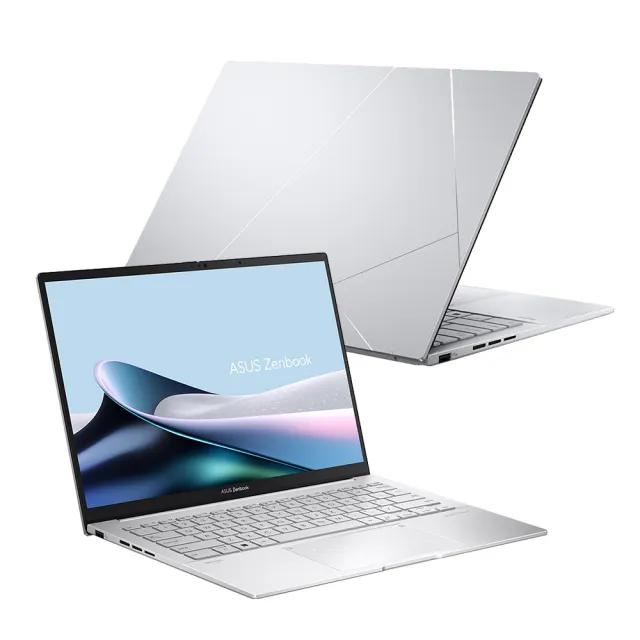
The ZenBook's aesthetic is undeniably gorgeous; it feels premium in hand with its aluminum body and minimalist design. I was immediately struck by how **thin and lightweight** it is—a true portable powerhouse that makes it perfect for life on the go. But then there were moments when I felt let down—like when I noticed that the hinges felt a bit flimsy compared to other laptops at this price point.
I also anticipated a robust keyboard experience, which Asus has generally excelled at in its past models. To my dismay, while it's comfortable enough for everyday use, the key travel was shallower than I expected, leaving me slightly underwhelmed during long typing sessions. It's frustrating when you invest in what is supposed to be a premium device and encounter these little annoyances right off the bat.
The OLED display itself? Absolutely stunning! Watching movies or editing photos is an absolute treat—colors pop vibrantly, making everything look alive. This genuinely impressed me; however, things took a downturn regarding brightness levels during outdoor usage. On bright sunny days, I struggled to see what was on the screen without leaning back into the shade. For *this price*, I certainly expected better visibility.
Another feature that caught my attention was the battery life—or rather lack thereof. During testing, I often found myself reaching for my charger sooner than anticipated, especially when multitasking with demanding applications like video editing software or even just keeping multiple tabs open in Chrome. It made me think twice about taking it on long outings without backup power.
In real-world scenarios, this laptop shines in a few aspects but falters in others. When using it for casual browsing and streaming content on Netflix or YouTube, I found myself enjoying every minute spent with this machine—it became my favorite lounging companion! However, during intense tasks like gaming or graphic design projects, heat buildup started to become an issue, which surprised me for something marketed as high-end.
The fan noise increased dramatically while performing these tasks as well; there were moments when it felt more like sitting next to an angry bee than a sleek laptop. **I was so annoyed when** I tried to enjoy a quick gaming session only to be distracted by all this noise from the fans doing their best but clearly struggling.
I desperately wanted to love the Asus ZenBook 14 OLED as my daily driver; its potential is written all over its vibrant display and stylish exterior. Unfortunately, corner-cutting compromises—like subpar battery life and fleeting build quality—left me feeling frustrated more often than not during daily use.
There’s plenty of brilliance here waiting to shine if you can overlook its shortcomings—but will that payoff feel worth it? In closing, I'd say: if you prioritize aesthetics and stunning visuals over sheer performance and robustness, you might find yourself enchanted by this laptop despite its flaws. But if you're looking for *true reliability* stuffed within that chic shell? You may need to extend your budget for something sturdier.
Camera Features1080p FHD | EthernetNo |
TouchscreenNo | USB Ports1x USB 3.2 Gen 1, 1x USB-C 3.2 Gen 2 |
Frequency (Hz)90 | Resolution2880 x 1800 pixels |
Audio QualityHarman Kardon Speakers | Body TypeAluminum |
HDMI PortsHDMI 2.1 | Processor BrandIntel |
RAM16 GB | Display TypeOLED |
Graphics CardIntel Iris Xe | Bluetooth VersionBluetooth 5.3 |
Dimensions313 x 220 x 15 mm | Cooling SystemSingle Fan |
SD Card ReaderNo | Battery Capacity75 Wh |
Wireless ChargingNo | RAM Speed4266 MHz |
Build StandardStandard | Processor Generation13th Gen |
Screen Resolution2880 x 1800 pixels | Display Size14 inches |
Ram16 GB | Storage512 GB SSD |
Processor Speed1.7 GHz base / 5.0 GHz boost | SensorsNo |
Special FeaturesTPM 2.0 | Gpu TypeIntegrated |
Cpu TypeIntel Core i7 | 3.5mm Audio JackYes |
Storage ExpandableYes (M.2 slot) | Graphics VRAMShared |
Display Touch SupportNo | Keyboard LanguageEnglish/Bangla |
ChipsetIntel Platform Controller Hub | dup34341.2 kg |
Warranty1 Year International Warranty | Battery TypeLithium-ion |
Processor Threads12 | Standby Time10-12 hours |
RAM Slots2 | Thunderbolt VersionThunderbolt 4 |
Refresh Rate90 Hz | Clock Feature12 MB cache |
Wifi SupportWi-Fi 6E (802.11ax) | dupll1 Year |
Device TypeUltraportable | Processor Cores10 |
RAM ExpandableYes (up to 32GB) | Model NameZenBook 14 OLED |
Processor ModelCore i7-1355U | Model Number2023 |
Storage Capacity512 GB | Cooling TechnologySingle Fan |
Charging Speed65W USB-C | Operating SystemWindows 11 Home |
Product DescriptionPine Grey | Weight1.2 kg |
Screen Size14 inches | Display CharacteristicsOLED, 400 nits |
Build MaterialAluminum | Usb TypeUSB 3.2 Gen 1 |
Battery75 Wh | Backlit KeyboardYes |
Available ColorsPine Grey | Storage InterfaceNVMe PCIe Gen4 |
BrandAsus | Audio Jack3.5mm Combo Jack |
App ControlNo |
Share feedback or ask a question about this product.