
© 2026 Kossti. All rights reserved.
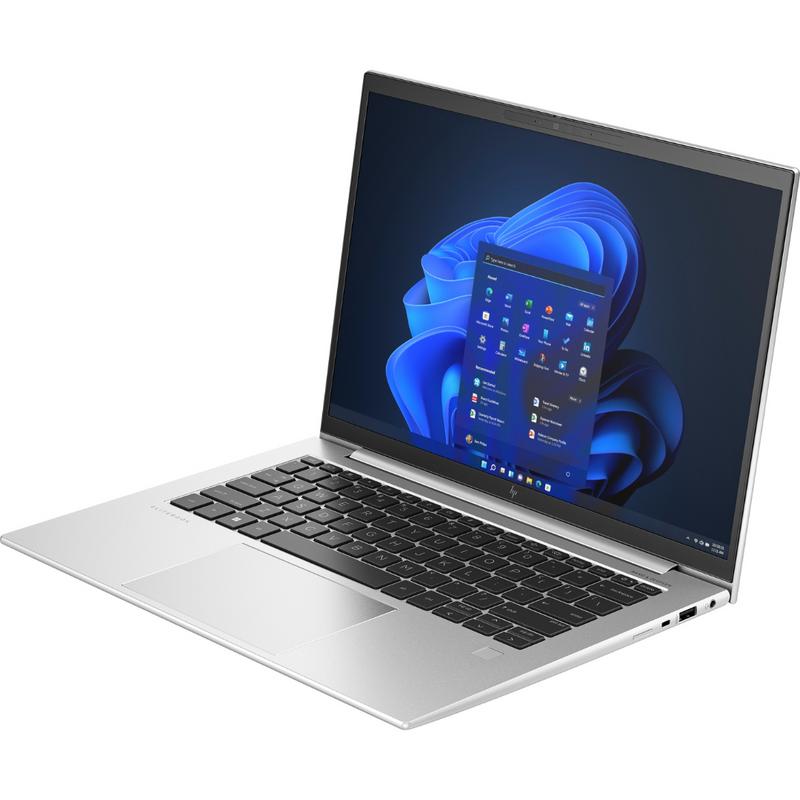
Unofficial specifications
Backlit KeyboardYes | Body TypeAluminum |
Special FeaturesTPM 2.0 | Processor ModelCore i7-1265U |
dup34341.3 kg | Model NameEliteBook 1040 G10 |
Operating SystemWindows 11 Pro | Model Number2023 |
Audio Jack3.5mm Combo Jack | Dimensions313 x 227 x 16.9 mm |
Keyboard LanguageEnglish/Bangla | Graphics CardIntel Iris Xe |
Screen Size14 inches | Battery61 Wh |
Clock Feature12 MB cache | Storage InterfaceNVMe PCIe Gen4 |
RAM ExpandableYes (up to 64GB) | Thunderbolt VersionThunderbolt 4 |
Build StandardBusiness | HDMI PortsHDMI 2.0 |
Usb TypeUSB 3.2 Gen 1 | Resolution1920 x 1200 pixels |
Audio QualityStereo Speakers | SD Card ReaderYes |
BrandHP | Screen Resolution1920 x 1200 pixels |
Storage Capacity512 GB | Camera Features1080p FHD |
EthernetYes | Build MaterialAluminum |
Storage512 GB SSD | App ControlNo |
Device TypeBusiness | Storage ExpandableYes (M.2 slot) |
Display Touch SupportNo | RAM16 GB |
Processor Generation12th Gen | Bluetooth VersionBluetooth 5.2 |
Wifi SupportWi-Fi 6E (802.11ax) | Frequency (Hz)60 |
Standby Time8-10 hours | SensorsNo |
Processor Threads12 | Graphics VRAMShared |
Battery Capacity61 Wh | Weight1.3 kg |
Refresh Rate60 Hz | Processor Speed1.8 GHz base / 4.8 GHz boost |
Processor Cores10 | RAM Slots2 |
TouchscreenNo | ChipsetIntel Platform Controller Hub |
Display Size14 inches | Display TypeIPS |
Gpu TypeIntegrated | Battery TypeLithium-ion |
USB Ports2x USB 3.2 Gen 1, 1x USB-C 3.2 Gen 2, 1x Thunderbolt 4 | Product DescriptionSilver |
Warranty3 Year International Warranty | Ram16 GB |
Charging Speed65W USB-C | Processor BrandIntel |
Cpu TypeIntel Core i7 | dupll3 Year |
3.5mm Audio JackYes | Cooling SystemSingle Fan |
Available ColorsSilver | RAM Speed5200 MHz |
Cooling TechnologySingle Fan | Wireless ChargingNo |
Display CharacteristicsIPS, 400 nits |
Reviewer
Jul 31, 2026
When you first unwrap the HP EliteBook 1040 G10, you'll immediately notice its sleek aluminum chassis exuding a sense of professionalism and quality. It feels sturdy in your hands without being overly heavy, making it easily portable for your daily commute or workplace needs. Expect to see a refined aesthetic that won’t draw too much attention but fits seamlessly into any business environment.
Upon opening the lid, the bright display greets you with vibrant colors and sharp details. The keyboard has a satisfying tactile feel, offering responsive feedback ideal for extended typing sessions. However, while the design might impress at first glance, some may find that it lacks the unique flair often seen in competitor models.
Your experience with performance will rely heavily on the formidable Intel Core i7 chip. In benchmark tests, you'll find that this machine can handle multitasking fairly well, powering through applications like Microsoft Office or Google Suite without breaking a sweat. However, be aware that during more intensive tasks such as video editing or CAD software usage, you might start to notice some performance slowdown due to throttling after prolonged loads.
The EliteBook 1040 G10 is no powerhouse; it performs adequately for general productivity. Yet if you're hoping for top-tier gaming or heavy computational work, disappointment may set in when it struggles during demanding benchmarks compared to similar priced devices. It's essential to calibrate expectations based on your intended use case before investing.
If you're planning on using this laptop for long periods, expect heat management concerns to crop up unexpectedly. When pushed hard—especially while using multiple applications—the CPU temperature rises noticeably, which leads to uncomfortable surface temperatures under heavy load. This cooling inadequacy could leave you distracted during intense working sessions.
The fan noise also tends to increase significantly during these moments of strain, potentially drawing attention in quieter environments like meetings or libraries. If silence is essential while working, be prepared for occasional disturbances as the laptop's cooling system kicks into overdrive.
Your eyes will appreciate the display’s detailed visuals thanks to its high resolution and decent color accuracy. In outdoor settings or well-lit environments, the brightness levels hold up surprisingly well; even direct sunlight won’t wash out your view entirely. While working on design projects or photo editing, you'll enjoy vibrant colors which remain truer than many other business laptops.
On the flip side, you may find some color calibration errors under certain conditions—particularly if relying solely on this for professional-level color work. While fine for most users’ needs, graphic designers should consider external monitors or calibration tools if accuracy is paramount in their workflow.
An area where you might experience frustration is with battery life. HP claims impressive longevity that falls short during real-world usage; plan on charging more often than expected when performing resource-intensive tasks throughout your day. Your productive hours dwindle quickly under heavier loads like streaming videos or extensive spreadsheet tasks.
The charging time isn’t particularly fast either; you'll wait longer than anticipated for full power recovery between sessions. If an unplugged day is what you're after, having a secondary charger at your workspace may become necessary as those long meetings and travel days start to pile up.
The camera quality might surprise you—though not always in a positive way. The built-in webcam offers mediocre clarity that won’t impress during video conferences; colors appear slightly washed out and low light performance leaves much to be desired. Expect further frustrations if relying heavily on video calls for client meetings or presentations.
This lackluster image processing can leave you feeling less professional while connecting with important contacts via webcam—a detail that others may easily overlook but can impact how your presence appears remotely.
This laptop certainly caters strongly toward business-centric functionalities with a solid build quality and reasonable performance handling everyday tasks gracefully. However, decision-making will depend heavily on what you prioritize most from a device: efficiency versus raw power capabilities.
If your work involves extended video graphics rendering or high-speed activity from various software platforms simultaneously, be prepared to make compromises in thermal performance and battery efficacy along the way. Alternatively, if lightweight portability with satisfactory handling of basic tasks aligns with your needs—this model does have its merits worth considering amid available alternatives within its category.
Share feedback or ask a question about this product.