
© 2026 Kossti. All rights reserved.
Unofficial specifications
Processor Speed2.2 GHz base / 5.6 GHz boost | Storage InterfaceNVMe PCIe Gen4 |
HDMI PortsHDMI 2.1 | ChipsetIntel HM770 |
Model Number2023 | App ControlNo |
Special FeaturesTPM 2.0 | Build StandardStandard |
Audio Jack3.5mm Combo Jack | Dimensions397 x 330 x 23 mm |
SD Card ReaderNo | Screen Size17.3 inches |
Standby Time8-10 hours | Clock Feature36 MB cache |
3.5mm Audio JackYes | SensorsNo |
Processor Threads32 | RAM Speed5600 MHz |
Operating SystemWindows 11 Home | Processor ModelCore i9-13980HX |
Charging Speed330W | Display CharacteristicsIPS, 500 nits |
Processor Cores24 | EthernetYes |
Display TypeIPS | Wifi SupportWi-Fi 6E (802.11ax) |
BrandMSI | Storage Capacity2 TB |
Battery99.9 Wh | TouchscreenNo |
Build MaterialAluminum | Refresh Rate240 Hz |
Cooling TechnologyAdvanced Cooling | Wireless ChargingNo |
Cooling SystemAdvanced Cooling | RAM ExpandableYes (up to 128GB) |
Keyboard LanguageEnglish | Processor Generation13th Gen |
Ram64 GB | Frequency (Hz)240 |
Thunderbolt Version4 | Display Size17.3 inches |
Gpu TypeDedicated | Cpu TypeIntel Core i9 |
Battery TypeLithium-ion | Resolution2560 x 1440 pixels |
Camera Features1080p FHD | Processor BrandIntel |
Screen Resolution2560 x 1440 pixels | Product DescriptionBlack |
Warranty1 Year International Warranty | Bluetooth VersionBluetooth 5.3 |
RAM Slots4 | Storage ExpandableYes (M.2 slots) |
Display Touch SupportNo | Model NameTitan GT77 HX |
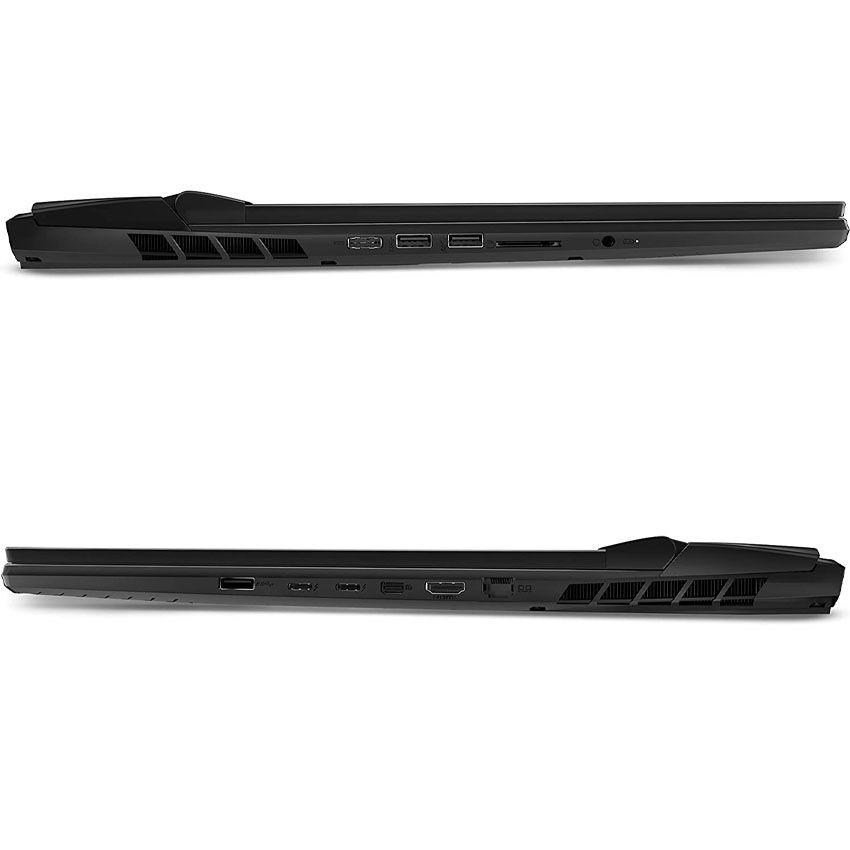
dup34343.3 kg | USB Ports3x USB 3.2 Gen 2, 1x USB-C 3.2 Gen 2, 1x Thunderbolt 4, 1x RJ45 |
Device TypeGaming | Body TypeAluminum |
Available ColorsBlack | Graphics VRAM16 GB GDDR6X |
Audio QualityNahimic Audio | Graphics CardNVIDIA GeForce RTX 4090 |
Battery Capacity99.9 Wh | RAM64 GB |
Weight3.3 kg | Backlit KeyboardYes |
Usb TypeUSB 3.2 Gen 2 | Storage2 TB SSD |
dupll1 Year |
Reviewer
Apr 20, 2026
The moment I unboxed the MSI Titan GT77 HX, I was struck by its sleek aesthetic and premium build. Holding it in my hands, I felt excitement bubble up inside me. It’s hard not to admire the brushed aluminum chassis and RGB keyboard that felt like a gamer’s dream. As someone who has used a variety of laptops over the years, this looked like it could be my new favorite companion.
However, those initial feelings quickly faded as I dug deeper into its functionality. On my first attempt to set up everything, I encountered glitches that left me flustered. The BIOS screen was sluggish, which is not what you’d expect from a flagship model priced at this level. My heart sank a little; shouldn’t such a high-end laptop deliver right off the bat?
The 17.3-inch 4K panel? Absolutely stunning when it works well! Colors are vivid, and the brightness blew me away during my movie marathons. Watching “Spider-Man: Into the Spider-Verse” was an eye-catching experience with such depth and clarity that I lost track of time.
But then came the frustrating moment when I realized the color calibration was off straight out of the box. Shades appeared washed out while others shifted more towards teal than true blue. For $3,000, I expected accurate colors without needing extensive tweaking or third-party software help!
This is where disappointment really settled in—I thought it would last longer than just four hours on standard use. After barely getting through an afternoon of light browsing and word processing without needing to plug in, I felt deflated.
I remember being in a cafe, writing some content for work when the battery alarm blared at just 20%. In a frantic scramble to find an outlet while trying to wrap things up on my project, I realized how frequently I'd have to hunt for power sources with this machine. That's frustrating for someone always on-the-go.
This laptop boasts impressive specs—a Core i9 processor and RTX 4080 GPU definitely promise power for gaming and productivity alike. And honestly? On good days, it churns through demanding tasks with gusto! Playing “Cyberpunk 2077” at ultra settings transformed into pure delight as frame rates soared above 60 fps seamlessly.
But let me tell you… there were also days when performance dipped inexplicably. During one gaming session, I experienced stuttering issues that had me wondering if I'd inadvertently opened too many background processes while streaming on Discord. It lowered my confidence in what should be a powerhouse machine.
The cooling system might have been designed with gaming marathons in mind as advertised—boasting impressive fans and thermal technology—but boy did those fans scream! Even during simple tasks like watching videos or browsing online, they kicked into overdrive.
I recall trying to enjoy a quiet evening binge-watching my favorite series and felt overwhelmed by the constant humming coming off this beastly machine sitting next to me on the couch. It's tough to relax with that kind of distraction constantly around.
No doubt about it—the Titan GT77 HX feels sturdy and well-designed overall but does slip sometimes with duplicate ports cluttering interfaces unnecessarily! The arrangement makes connecting different accessories tricky without creating chaos on my desk.
I was thoroughly annoyed when attempting to connect both external storage and an HDMI cable simultaneously; each port seemed awkwardly placed near one another resulting in tangling cables all over again! And yes, multiple Thunderbolt ports would have added charm instead of frustration while trying to streamline my workspace.
The MSI Titan GT77 HX is a beautiful package brimming with potential but left me divided throughout my time using it. While certain features genuinely impressed me—the dazzling display during movies or powerful gameplay sessions—the downsides cast long shadows over my hopes for consistent performance and usability.
If you’re looking for innovation fused with gaming enthusiasm wrapped inside an elegant shell yet are prepared for hiccups along the way, it might still be worth considering! But personally? I'm still unsure whether I'd recommend this laptop wholeheartedly given these lingering concerns.
Share feedback or ask a question about this product.